Output Data Format
The output data format for memtab is primarily JSON. The tool will generate a JSON file containing the memory usage information of the code being analyzed.
This JSON file can be used for further processing or visualization.
More on processing the output data format can be found on the Post Processing Data page.
Output Schema
type |
object |
|
properties |
||
|
The version of the schema. |
|
type |
string |
|
const |
1.2.0 |
|
|
An array of memory symbols. |
|
|
An object containing memory regions. |
|
|
An object containing ELF sections. |
|
|
Origin-defining metadata of the ELF file that the memory table corresponds to. Things like repo, date, build ID, etc. |
|
|
The project name. This is used to correlate this build with a project. A project CAN have multiple builds (repositories) associated with it. |
|
type |
string |
|
|
The build information. Typically if running on GHA, it will be populated from there, otherwise its all unknowns. When from GHA, you can view this for supporting documentation: https://docs.github.com/en/actions/writing-workflows/choosing-what-your-workflow-does/store-information-in-variables#default-environment-variables |
|
additionalProperties |
False |
|
symbol_array
An array of memory symbols. |
|
type |
array |
items |
|
minItems |
1 |
memory_symbol
A memory symbol object. |
|||
type |
object |
||
properties |
|||
|
The symbol name. |
||
type |
string |
||
|
The memory address of the symbol. |
||
minimum |
0 |
||
|
The size of the symbol in bytes. |
||
|
The type of the symbol. |
||
type |
string |
||
|
The file where the symbol is defined. |
||
type |
string |
||
|
The commit sha where the symbol is defined. |
||
type |
string |
||
pattern |
^[a-f0-9]{40}$|^unknown$ |
||
|
The repository where the symbol is defined. |
||
type |
string |
||
|
The line number in the file where the symbol is defined. |
||
type |
integer |
||
minimum |
0 |
||
|
The category(categories) of the symbol. |
||
type |
object |
||
patternProperties |
|||
|
The category of the symbol. |
||
type |
string |
||
|
The memory region of the symbol. |
||
type |
string |
||
enum |
RAM, Code, Flash, unknown |
||
|
The subregion of the symbol. |
||
type |
string |
||
|
The elf section of the symbol. |
||
type |
string |
||
|
The assigned size of the symbol. If its greater than size, there is some unused memory above. If it is less than size, there is shared memory with another adjacent symbol. |
||
type |
integer |
||
minimum |
0 |
||
additionalProperties |
False |
||
dec_or_hex
oneOf |
type |
string |
pattern |
^(0x[0-9a-fA-F]+|[0-9]+)$ |
|
type |
integer |
|
minimum |
0 |
region_array
An array of memory regions. |
|
type |
array |
items |
|
minItems |
1 |
memory_region
A memory region. Note these correlate to regions defined in the input config, NOT ELF regions. |
||
type |
object |
|
properties |
||
|
The name of the memory region. Correlates to the region names from the input config |
|
type |
string |
|
|
The start address of the memory region. |
|
|
The end address of the memory region. |
|
|
The size of the memory region. |
|
|
The memory region type. |
|
type |
string |
|
enum |
RAM, Code, Flash |
|
|
The flags associated with the region, if any |
|
type |
string |
|
|
The memory region type. |
|
type |
string |
|
enum |
RAM, Code, Flash |
|
|
the amount of spare memory left in the region. |
|
additionalProperties |
False |
|
metadata
type |
object |
||
properties |
|||
|
The filename of the ELF file that the memory table corresponds to. |
||
anyOf |
Unix/Linux path format for ELF files |
||
type |
string |
||
pattern |
^[a-zA-Z0-9\-_./]*[a-zA-Z0-9\-_]+\.elf$ |
||
Windows absolute path format for ELF files |
|||
type |
string |
||
pattern |
^[A-Za-z]:[a-zA-Z0-9\-_.\\]*[a-zA-Z0-9\-_]+\.elf$ |
||
|
The size of the ELF file that the memory table corresponds to. |
||
|
The md5 hash of the ELF file that the memory table corresponds to. |
||
type |
string |
||
pattern |
^[a-f0-9]{32}$ |
||
|
The version of the memtab python package that generated this file. |
||
type |
string |
||
pattern |
^[0-9]+\.[0-9]+\.[0-9]+$ |
||
|
The timestamp of the build that produced this memory table. If using GHA, this corresponds to “created_at” from https://docs.github.com/en/rest/actions/workflow-runs?apiVersion=2022-11-28#get-a-workflow-run |
||
type |
string |
||
format |
date-time |
||
|
type |
object |
|
properties |
|||
|
The commit hash of the build that produced this memory table. If using GHA, this corresponds to “head_sha” from https://docs.github.com/en/rest/actions/workflow-runs?apiVersion=2022-11-28#get-a-workflow-run |
||
type |
string |
||
|
The repository name of the build that produced this memory table. If using GHA, this corresponds to “repository.name” from https://docs.github.com/en/rest/actions/workflow-runs?apiVersion=2022-11-28#get-a-workflow-run |
||
type |
string |
||
|
The owner of the repository that produced this memory table. If using GHA, this corresponds to “repository.owner.login” from https://docs.github.com/en/rest/actions/workflow-runs?apiVersion=2022-11-28#get-a-workflow-run |
||
type |
string |
||
|
The build ID of the build that produced this memory table. If using GHA, this corresponds to “id” https://docs.github.com/en/rest/actions/workflow-runs?apiVersion=2022-11-28#get-a-workflow-run |
||
type |
integer |
||
|
The name of the build that produced this memory table. If using GHA, this corresponds to “name” from https://docs.github.com/en/rest/actions/workflow-runs?apiVersion=2022-11-28#get-a-workflow-run |
||
type |
string |
||
|
The URL of the build that produced this memory table. If using GHA, this corresponds to “html_url” from https://docs.github.com/en/rest/actions/workflow-runs?apiVersion=2022-11-28#get-a-workflow-run |
||
type |
string |
||
additionalProperties |
False |
||
additionalProperties |
False |
||
build
properties |
||
|
type |
integer |
|
starts at 1 if run in GitHub, increments for each retry. If not run in GitHub Actions, this is 0. |
|
type |
integer |
|
minimum |
0 |
|
|
The commit SHA of the build. |
|
type |
string |
|
pattern |
^[a-f0-9]{40}$ |
|
|
type |
string |
|
type |
string |
|
type |
string |
|
type |
string |
|
type |
string |
|
type |
string |
additionalProperties |
False |
|
elf_sections_array
An array of ELF sections. These is similar to the regions, but is an ELF standard definition, rather than a memtab definition. |
|
type |
array |
items |
|
minItems |
1 |
elf_section
An ELF section object. This can be thought of as the sections listed in readelf -SW |
||
type |
object |
|
properties |
||
|
The name of the ELF section. |
|
type |
string |
|
|
The address of the ELF section. |
|
|
The size of the ELF section. |
|
|
The flags of the ELF section. |
|
type |
string |
|
|
The calculated size of all the symbols in the ELF section. |
|
type |
integer |
|
minimum |
0 |
|
|
The type of the ELF section. |
|
type |
string |
|
enum |
PROGBITS, NOBITS, DYNAMIC, FINI_ARRAY, INIT_ARRAY, REL, VERNEED, VERSYM, GNU_HASH, NOTE, RELA |
|
|
The amount of unused space at the start of the ELF section. It can be zero if the first symbol is right at the start of the section. |
|
additionalProperties |
False |
|
Size vs. Assigned Size
You will notice in the output that there are two different size metrics reported: size and assigned_size.
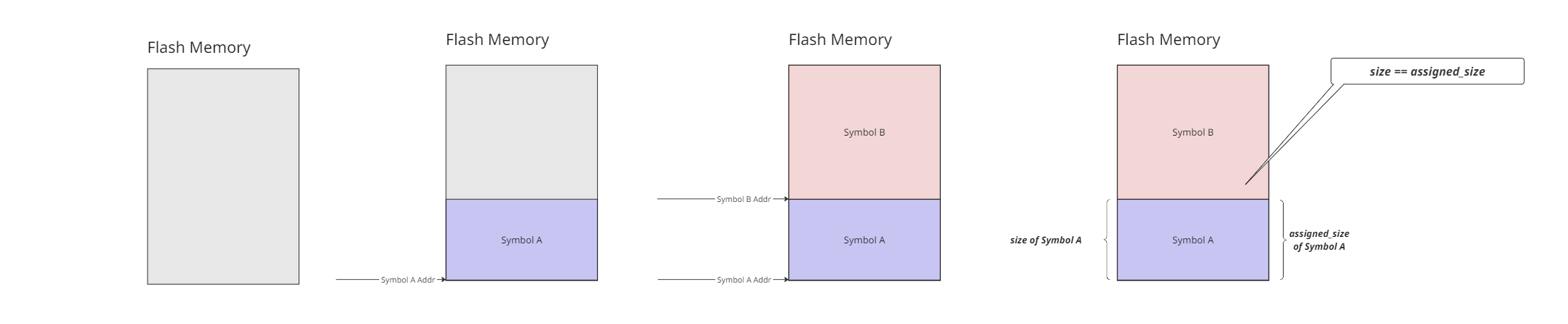
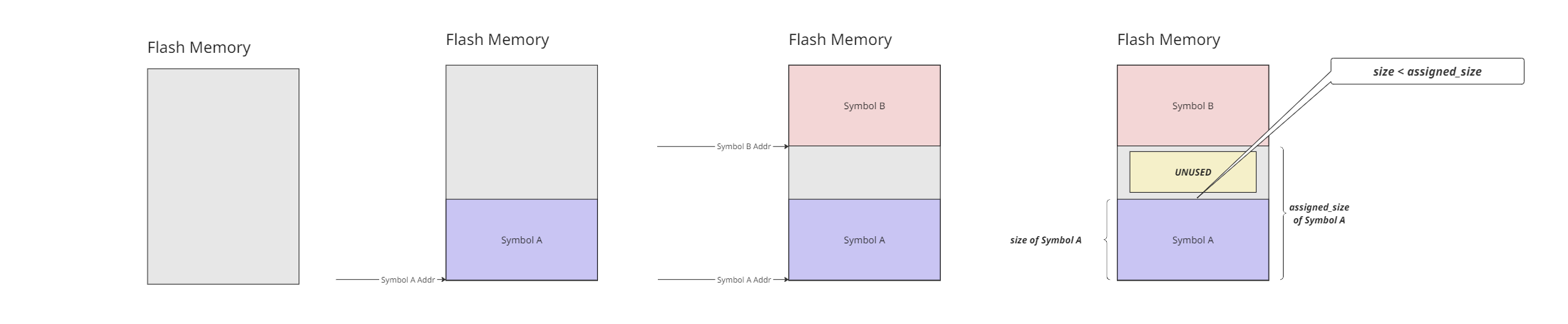
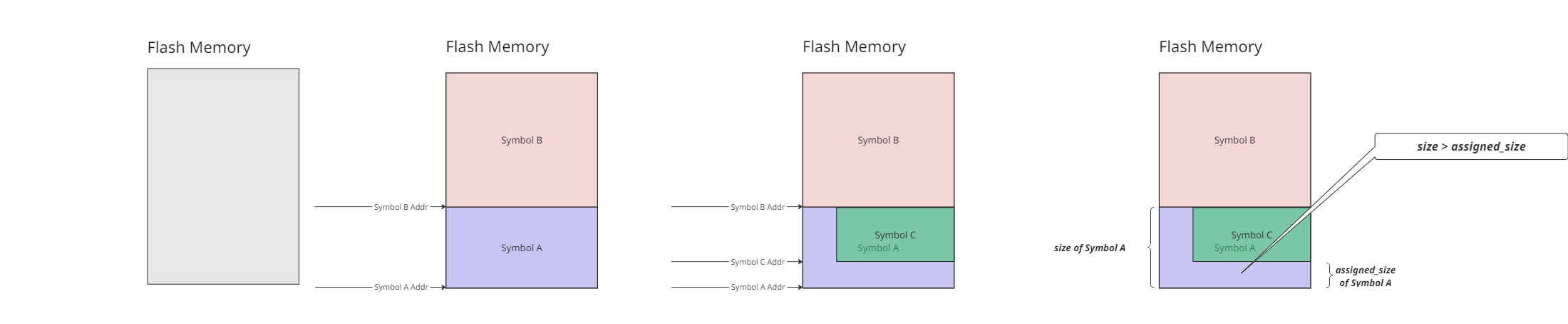
size refers to the total memory usage of the object, including any memory “reused” or “shared” with another symbol.
assigned_size is the memory unique to the object itself.
This distinction is important for understanding the true memory footprint of your data structures and can help identify potential optimizations.
There are three distinct scenarios when comparing size to assigned_size:
size == assigned_sizeIn this scenario, the object does not share/reuse any code, and it is immediately adjacent to the next symbol in memory.
size < assigned_size1. In this scenario, there is some unused memory between this symbol and the next in memory, and thus that padding is allocated to this symbol. See the Wikipedia page on Data Structure Alignment for more information.
size > assigned_sizeIn this scenario, the object shares memory with another object, leading to a larger reported size.
With these definitions, the design intent is that the sum of assigned_size should add up to the available size of flash memory.